Building & Deploying a Project
Bu içerik henüz dilinizde mevcut değil.
A project reaches a target in two parts. Everything is transferred first, and the target takes it as one change only when the deployment is activated. Until that moment the machine is running what it was running before.
The PLC is compiled to native code, so Target Architecture in the toolbar (x64, ARM64
or ARM32) has to be the target’s own before you build: a build made for the wrong one fails.
Nothing takes effect as it arrives
Section titled “Nothing takes effect as it arrives”The compiled configuration, the PLC program, its symbols and alarm text, and the machine’s access policy are transferred one after another, and none of them changes the running machine on its own. The activation at the end is what makes the target adopt the new set.
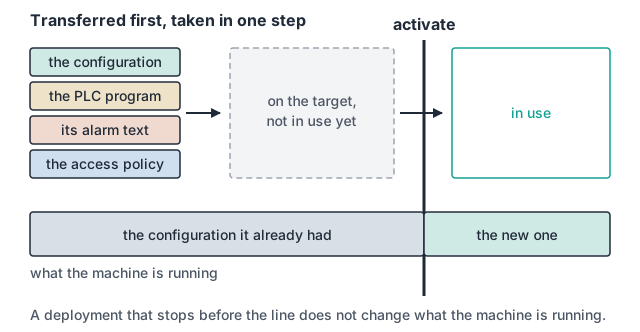
A deployment that stops before its activation does not change what the machine is running.
What stops a deployment, and what does not
Section titled “What stops a deployment, and what does not”| The access policy fails to transfer | the deployment fails |
| The alarm catalogue is missing from the project | the deployment succeeds |
The two are deliberately different. A machine whose access policy quietly failed to arrive runs on the platform’s defaults while you believe it is running on yours, and nothing on the machine says so. A missing alarm catalogue is visible the first time an alarm comes up as numbers, so it is left to be found rather than made fatal.
Getting back onto a running target
Section titled “Getting back onto a running target”The environment connects to a target that is already running and shows its live values beside the code that sets them. Diagnosing a machine and writing its logic happen in the same place, so a value that is wrong is read where it is produced.
Where to go next
Section titled “Where to go next”- Development System: what a build produces, and what each part carries.
- Simulation: proving what can be proven before a target exists.