Linking
Bu içerik henüz dilinizde mevcut değil.
An axis is joined to its drive and to your logic on the axis’s own page. Everything else the machine reads and writes is joined here. A variable your PLC project declares and the process data of a terminal are two separate variables until you link them, and until then the logic reads what the variable was initialised to rather than what is on the wire.
Making a link
Section titled “Making a link”Right-click either variable in the tree and choose Edit Link: both ends are variables, so
it does not matter which one you start from. The dialog holds the project’s whole variable
tree, Select makes the link and Clear Link takes it away. A linked variable carries [L]
in front of its name, and its own page names the other end under Linked Qualified Name.
The link belongs to both ends, so either end clears it and linking a variable that is already linked drops the earlier link without asking. Which way the data travels is not asked: a variable your project declares as an input is written from the process data, one it declares as an output is written to it.
Size decides it, and type does not
Section titled “Size decides it, and type does not”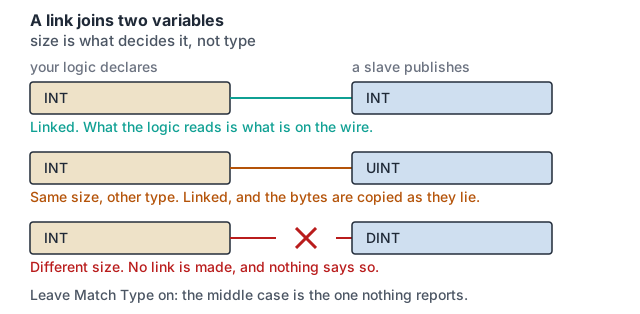
Match Type and Match Size start on every time the dialog opens, and a candidate that does
not match is greyed and cannot be picked. They filter what you can choose. They do not
decide what is allowed. Two sides of the same size are linked whatever their types are, and
nothing converts between them or reports the difference.
Size is matched in whole bytes, which is coarser than the width the list shows: a one-bit signal your logic declares and a digital input holding a byte of the process image are the same size to the filter and to the link.
What clears a link
Section titled “What clears a link”A slave’s variables are made from the process data it is assigned. Change what is assigned and they are made again, and a variable that has been made again is not the one the link pointed at:
| what you change | what it clears |
|---|---|
| assigning or unassigning a PDO on a slave | every link on that slave |
| adding or removing a module in a slot | every link in the project |
Scan Devices, applied so that it replaces what is already there | every link on the slaves it replaced |
| importing an ESI file | nothing: an import does not reach a slave the project already holds |
Nothing asks first, and nothing lists afterwards what was cleared. So assign the process data first and link last. A slave keeps the description it was added with, so applying a newer one means removing the slave and adding it back, which clears its links as well.
What nothing checks
Section titled “What nothing checks”There is no record that a variable was meant to be linked. An unlinked variable is left out of the configuration a build produces, so it is never exchanged and holds what it was initialised to, and there is nothing for the build to refuse. A link whose other end has left the project is dropped when the configuration is generated, while the variable still reads as linked on its own page.
A link you can see is not proof that anything reaches the wire. What proves it is the value, read on the target.
Where to go next
Section titled “Where to go next”- I/O & EtherCAT: assigning the process data that becomes the variables linked here.
- Motion & NC: the axis’s own two links, made elsewhere.
- PLC: the logic that reads and writes them.