Motion & NC
Bu içerik henüz dilinizde mevcut değil.
An axis and a channel are both created under Motion, and they are not two sizes of the same thing. An axis is one moving thing that your logic commands. Gather axes under a channel and they stop being separate: they become the axes of a CNC, run by a part program.
They are not added from the same place either.
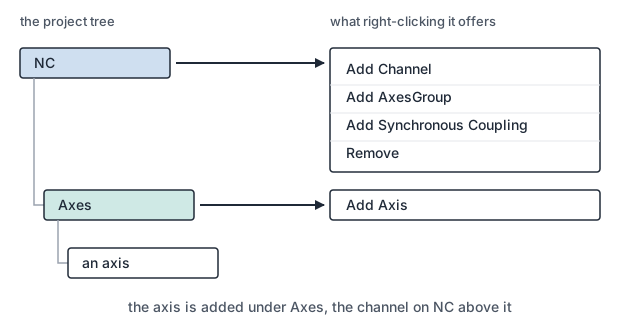
Bringing an axis in
Section titled “Bringing an axis in”- Add the axis. Right-click
Axesand chooseAdd Axis. - Say what it is. On the axis’s own page,
Nameis not a label: inside a channel it is the role, so an axis namedXis the channel’s X.Channel IDsays which channel it belongs to. - Join it to the drive. Right-click the axis and choose
Edit Link.Only unusedhides the drives already spoken for. - Join it to your logic. Not from the menu:
Select Axis Refsits on the axis’s own page. - Gather them into a CNC. Right-click
NCand chooseAdd Channel.
An axis is joined to two things
Section titled “An axis is joined to two things”An axis is not the drive and it is not the variable. It is the thing between them, and it carries a link to each:
Linked Slave (I/O) | the drive on the fieldbus that this axis moves | from Edit Link |
Linked PLC (Axis Ref) | the variable your logic commands it through | on the axis’s page |
They are made in two different places, and the second is the one that gets missed: an axis
with a drive and no Axis Ref moves nothing, because your logic has nothing to command it
through. The Servo Type says what the drive speaks, and the Unit decides what every other
number on the axis means.
Adding a channel is adding a CNC
Section titled “Adding a channel is adding a CNC”A channel gathers axes and gives each one a role: X, Y, Z, A, B, C. Nothing under
the axis changes. The same drive is still on the bus, the same variable is still in your
logic. What changes is who commands it.
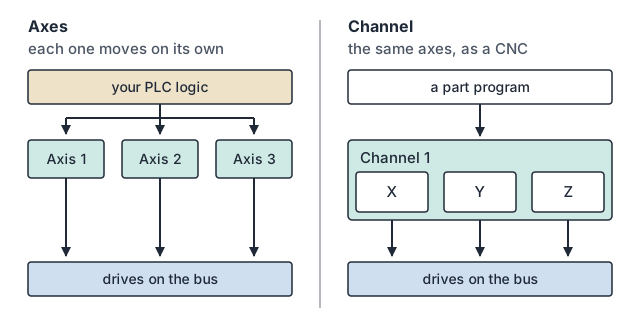
Outside a channel, axes are motion: your logic starts them, one at a time or as a group you coordinate yourself. Inside a channel they are the axes of a CNC, and a part program moves them together along a path.
So the channel is the CNC. There is no second thing to add: a machine with no channel is a motion machine, and the moment it has one it is a control that runs part programs. A machine that needs two of them carries two channels.
The parameters sit at two levels
Section titled “The parameters sit at two levels”Some of what the machine needs to know belongs to one axis alone: what it is joined to, what its units are, how far it may travel, how its error is corrected. That is set on the axis and stays true wherever the axis is used.
The rest means nothing until axes move together: how the machine’s geometry is solved, how a path across several axes is planned, what the channel treats as the spindle. That is set on the channel.
When you cannot tell which level a value belongs to, ask whether it would still be true if this axis were the only one on the machine. If it would, it belongs to the axis.
Motion brings two tasks of its own
Section titled “Motion brings two tasks of its own”Motion does not run inside your PLC task. Adding it to the project adds two real-time tasks,
which appear under NC and carry the same period, priority and core as any other task:
NC Preparation | turns the part program into the motion that is coming, ahead of the cut, at its own longer period |
NC Execution | issues that motion one cycle at a time, runs the axes, and exchanges the drives’ process image |
NC Execution is the rate the machine is commanded at. Axes and channels are created
under it and take their rate from it, and the drives are in the sync unit group it exchanges,
so its period is both the interpolation rate and the rate the bus carries it at. Shortening it
asks more of the target every cycle; lengthening it coarsens every path the machine cuts.
NC Preparation works ahead of what is being cut, so it is given a longer period and a lower
priority than execution. It is the task a program’s look-ahead depends on: a channel that has
nothing prepared has nothing to issue, however fast execution runs.
Your PLC task keeps its own period and its own priority: it asks for motion rather than performing it, which is why a slow scan in your logic does not become a rough surface on the part.
A chain that cannot be solved stops the build
Section titled “A chain that cannot be solved stops the build”The build refuses a chain the solver cannot use, and names what is wrong with it. Two things it will not take:
- A rotary axis whose part in the chain is missing, or claimed by two axes at once.
- Three linear axes that do not point in three independent directions.
That refusal is the last cheap moment. A chain that got past it would reach a target as a configuration that has already shipped, where the same fault shows up as a machine moving wrongly rather than as a message naming the axis.
Where to go next
Section titled “Where to go next”- I/O & EtherCAT: bringing the drives onto the bus, so an axis has something to link to.
- Linking: the third link, joining a variable to a terminal’s process data.
- PLC: the logic that commands the channel.
- Building & Deploying a Project: what compiling produces, and how it reaches a target.