Simulation
A project runs with no hardware attached. What runs is the project itself rather than a model of it, and that is what it asks of you first.
The project has to be finished before it can be simulated
Section titled “The project has to be finished before it can be simulated”The devices are the real ones. The drives and the I/O the machine will have are brought in from their vendors’ own descriptions, given their addresses, and mapped to the axes and the signals exactly as they will be mapped on the machine. The PLC program is the one that will ship. The screens are the ones the operator will use.
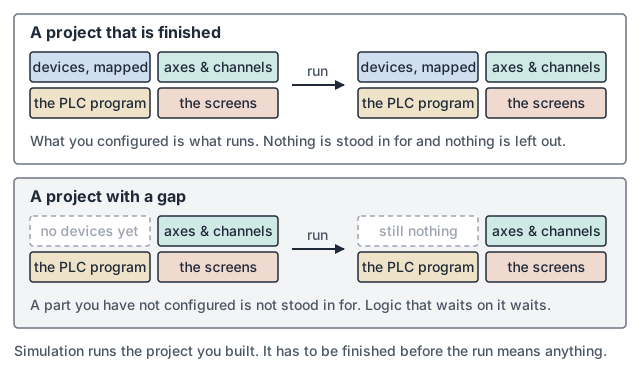
Nothing is stood in for. A part you have not configured is not filled in by the simulation, and logic that waits on it waits.
What the run does not settle
Section titled “What the run does not settle”A program that runs clean has shown its geometry and its sequence. What it has not shown is whether the machine can hold that path, at that feed, with that tool. Those belong to the machine and are worth proving there:
- how the drives behave under load, and what they report when they are unhappy
- what a device does as it starts up, and when it is not ready
- the mechanism itself: the tool changer, the guards, the clamps, the probes and the limits
Where to go next
Section titled “Where to go next”- I/O & EtherCAT: bringing the real devices in, and mapping them.
- The Project: where the active target is recorded.
- Building & Deploying a Project: getting onto a real target.